Create basedata and configurations
-
Start Kentucky and login with your Admin account (NOT your regular account which has no rights for configurations)
-
go to File / Basedata
-
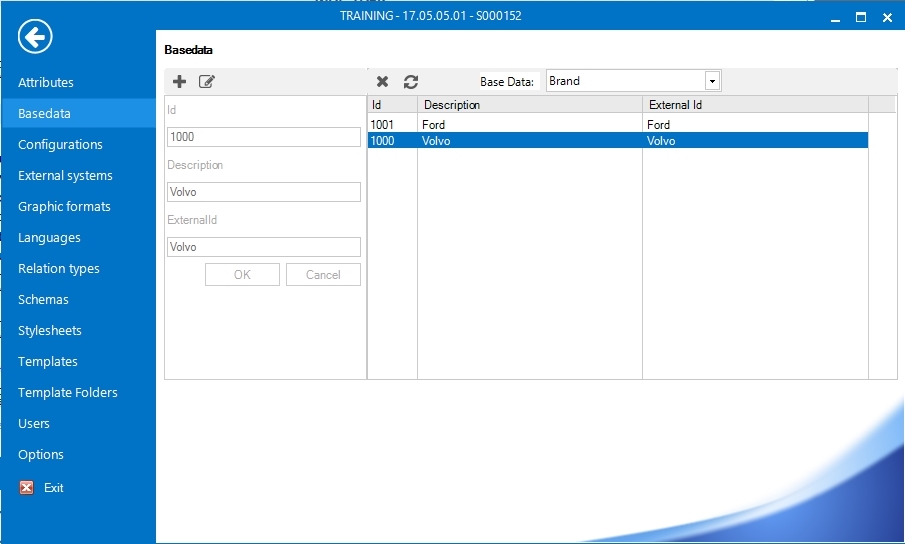
Select the "Base data" field at the top and select the group you want to add configurations for.
-
Click on the Add icon (plus sign) top left in the toolbar.
-
Fill in Id and a short description in the "Description" field. Keep the description as short as possible and avoid spaces if possible. When used as part of a configuration (which contains several different basedata's) the config string can be very long and hard to understand if to long description texts is used on each basedata.
-
Click OK.
-
Go to File / Configurations
-
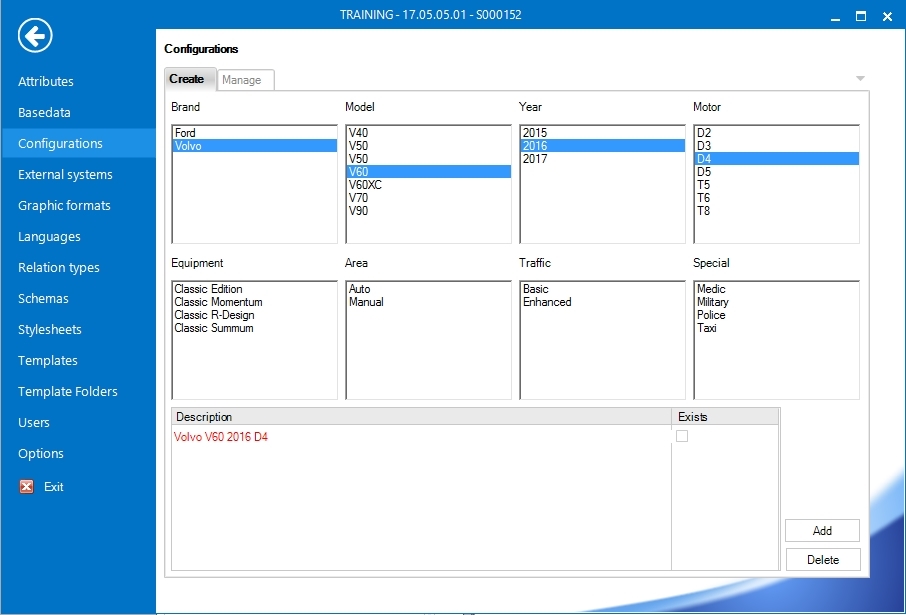
Select the config combination you need, for example : Brand = Volvo, Model = V60, Year = 2017, Engine = D4, Equipment = Classic Edition.
-
For each panel you select an item for, the combination is displayed in the "Description field" below. If the current combination is not created yet, it turns red.
-
Continue select a combination until it turns red, if not already. For this exercise, select at least two items, even if one item works to.
-
Select your combination in the "Description" field. Click the Add button. Your combination is created and turns black with the checkbox beside it filled in.